Summary
Using AI to speed up submission analysis brought an estimated 60 to 80 hour job down to 27 hours. I used ChatGPT Plus and Claude Pro to analyse more than 650 submissions on a public consultation, and to complete the work within a tight timeframe.
In this article I reflect on what I did, what worked well, and what I’ll do differently next time. It includes:
- how I prepared the consultation feedback for sharing with AI
- the benefits of using two different AI models to allow for double-checking of submission counts
- why the counting of submission numbers (support, oppose, neutral) needs to be done at the end of the process
- the disclaimer I provided to explain this AI-supported process
- when it makes sense to train your team on using AI for feedback analysis and when you will be better off getting direct help.
A council received over 650 submissions on a public consultation with 10 different questions and lots of detailed comments. The job took 27 hours, and it was completed on time. It would have taken at least two weeks, and at least 60 hours to process the traditional way (and maybe closer to 80 hours).
It was an intense project, and I felt really depleted for the rest of the week after delivering this work in five days to meet a tight deadline. But it’s a great example of what’s now possible with the help of AI.
Using AI to help with this project felt like using my very high-powered line trimmer to cut down the long grass, bringing order to the chaos. It’s a powerful machine, but you need to keep your wits about you when using it!
Before we get into the nitty gritty, here are my answers to four key questions.
Is it safe to use AI to analyse submissions?
That depends on how you set it up. In this project, no submitter names or contact information were shared with AI because I copied the support/oppose/neutral response and the related comments for each of the 10 questions from the original Excel spreadsheet into standalone Word documents for each question.
Providing these source documents to the client at the end of the process allows for easy checking of my numbers and the categorisation of the comments, if required.
I used my paid AI accounts and made sure that ‘using my data to train the model’ was turned off in the settings of both accounts. I don’t recommend ever doing this kind of work using free AI accounts.
Which AI tools do you use for analysing submissions?
I used ChatGPT Plus and Claude Pro for different jobs. I started with ChatGPT Plus (on the high setting) to sort the comments into themes because it’s more of a workhorse than Claude when it comes to bulk work like this.
Then I used Claude Pro (Opus 5 model) to double-check everything, to provide concise summaries for each theme, and to create the graphs in Excel. (I tried generating the graphs with ChatGPT Plus but they weren’t as good.) I also used Claude Pro to format the final reports.
Note: I haven’t used Copilot for this kind of work as I only have the standard version of Copilot that’s included with my Microsoft 365 Personal subscription, so I can’t say how its performance for these tasks compares to ChatGPT Plus and Claude Pro (in September 2026).
How do you check that AI has categorised comments accurately?
I manually checked the categorisations prepared by ChatGPT Plus.
Then I used Claude Pro to:
- Check ChatGPT’s numbers – the counts of support/oppose/neutral and the number of comments under each theme, and they were the same, which was a big relief!
- Check for submitter comments that didn’t match the submitter’s stated preference (e.g. someone who ticked ‘support’ but whose comment was clearly opposed).
- Review ChatGPT’s categorisations of the comments. Some minor changes were made through this process.
It was brilliant at spotting inconsistencies. But I made all the relevant changes myself to the source documents because I wanted to be in control of any changes to the data, rather than pushing play and hoping AI would do exactly what I wanted.
Should you tell readers that AI was used to analyse the submissions?
Yes. Here is the AI-assisted analysis disclaimer I provided to my client.
We used licensed versions of ChatGPT Plus and Claude Pro to assist with categorising and counting submissions and comments, and to double-check the accuracy of the data. Claude Pro was also used to draft plain-language summaries of the comments. Human oversight and decision making was central to every step in this process.
What worked well, and what I’d do again
Use Claude to provide concise summaries for each theme
The last time I worked on an AI-supported feedback analysis project, I manually selected a sample of representative comments for each category and asked AI to create summaries based on those comments. I didn’t have time to do that for this project, so I tried asking Claude to summarise directly from my list of 650 comments for each category. It did a brilliant job.
Break the process down into small steps, but stay in the same chat for each topic
I set up a detailed prompt with a lot of background information for each consultation topic, then stayed in that chat for the remainder of the categorisation process, saying ‘now do the next one the same way’.
I thought it might be better to start a new chat for a different group of submissions (e.g. the ones submitted as emails rather than online submissions, in order to reduce the memory load). But when I asked that question, ChatGPT said it was better to stay in the same chat for consistency, as the rules for the process were already established.
Get AI to create Excel graphs and polish the final report
I gave Claude my plain draft to format and it came back looking much fancier than I could do myself, especially under time pressure. I checked each paragraph to make sure the changes were only cosmetic (and they were).
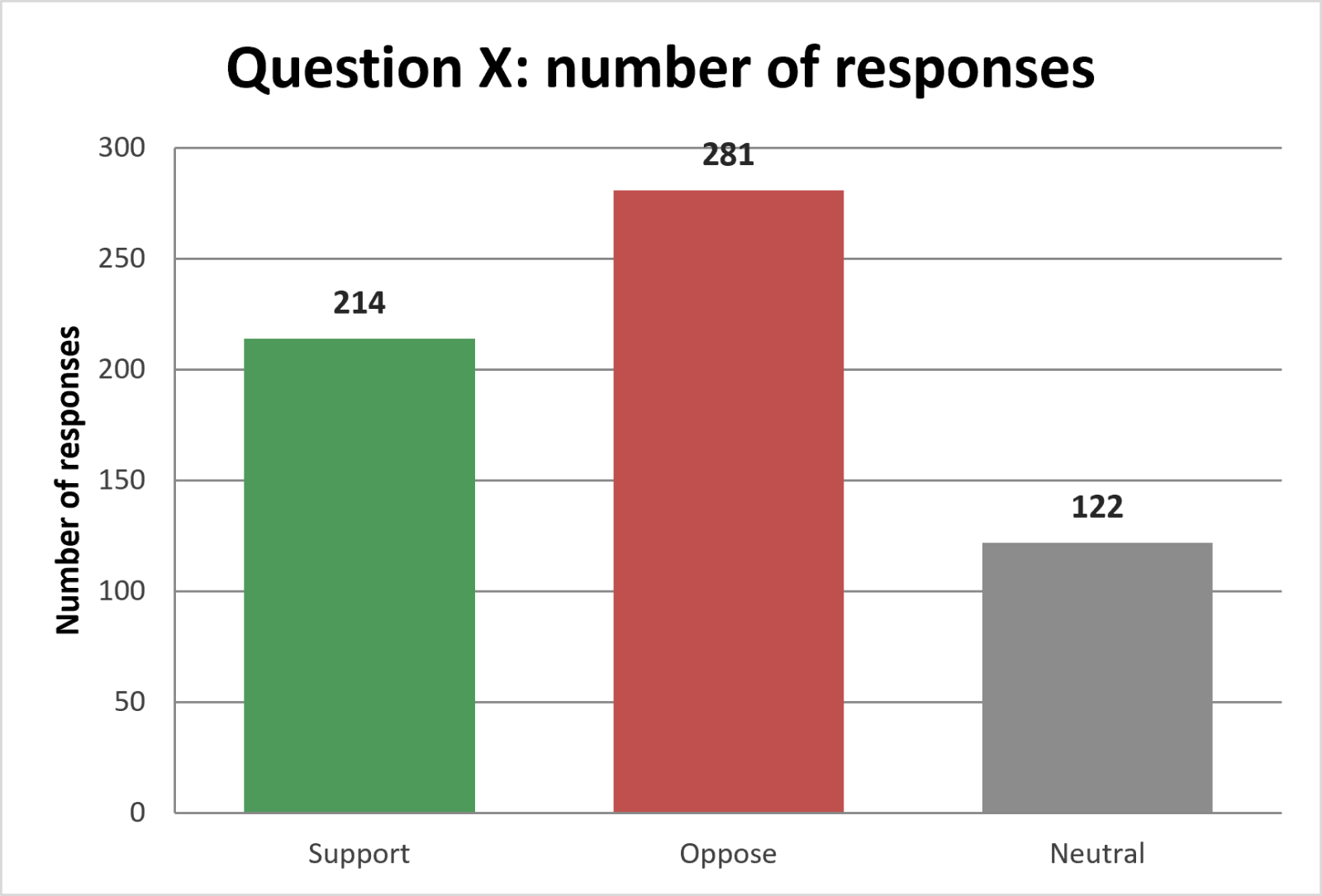
I then asked Claude to refer to the nine tables of numbers (support/oppose or preferred options) for the graphs and it did a brilliant job of creating a workbook of consistent graphs. I’m not very comfortable with Excel so this was a real boon to me!
Note: the graphs need to be prepared separately, as an Excel workbook, and to be added after the formatting process, rather than beforehand.
Buy extra credits as needed
I spent $35 on more credits for both ChatGPT and Claude at key times when I was doing a lot of heavy duty work with them, and it was worth every dollar to be able to maintain momentum and focus, rather than to pick up the process later.
Mistakes, and what I’d do differently next time
None of these mistakes affected the accuracy of the final results, but they put me under time pressure I could have done without!
Count last
I spent time on the first day using ChatGPT Plus to count the numbers of support, opposition and neutral responses, before digging into the details of categorising comments. Later on, I realised those original sets of numbers couldn’t be used because they altered slightly during the process of checking for mismatches between the support/oppose/neutral selections and the comments.
However, I still recommend doing these counts on two different AI models, as a cross-checking exercise.
Experiment with rewording the categories
The themes I used for categorising responses to one of the questions were not well understood by ChatGPT Plus. That led to unreliable categorisation. When I realised this, I categorised the whole set of 650 comments by hand. In retrospect, it would have been worth spending a bit of time experimenting with improving the wording of the themes to make them understood by AI, rather than jumping straight to my time-consuming manual solution.
Options: Train your team to use AI for feedback analysis or get direct help
Once you see what’s possible with using AI to support feedback analysis, you won’t want to go back to your old way of doing it. There are two ways to get the benefits of AI without putting accuracy at risk, and the best option for you depends on where you are right now.
Training your team makes sense when:
- consultations are a regular part of your team’s work
- you have breathing room before the next consultation process (learning a new method in the middle of a live consultation doesn’t give you time to experiment or leeway to make mistakes)
- you want a shared way of working that doesn’t disappear when someone leaves.
Getting direct help makes sense when:
- the feedback is already in and the deadline is close
- your team is already stretched
- your team only has licensed access to Copilot, and you’d rather not be figuring out its capabilities for this kind of job, or subscribing and learning to use new AI models in the middle of deadline pressures.
My workshop on using AI to speed up feedback analysis shows you how to use AI for this type of work and gives your team plenty of practice at applying these methods. This is the best way to become familiar with the process and confident with making use of AI in this situation.
Alternatively, I can do it for you, passing on the benefits of AI-supported feedback analysis.
If either of these options appeal, please email me at debra.bradley@writingforcouncils.co.nz or phone 021 215 4698 and we can discuss the details.
About the author
Debra Bradley writes strategies, policies, plans and reports for councils and not-for-profit organisations across New Zealand, and trains their teams to use AI without losing ownership of their work.