This set of four AI tools will help you create clearer, more engaging consultation documents – without putting sensitive information at risk.
Here’s how the tools can help you to create quality consultation documents.
This tool helps you articulate exactly what you’re consulting on by:
This tool helps you to create the framework for your consultation document by:
This tool helps you to elevate the quality of your draft document by suggesting improvements to specific aspects of your document.
Develop quality feedback questions that go beyond “do you support this proposal?”
All you need to do is upload your draft consultation document, respond to a few questions, and you’ll receive a draft feedback form to review.
These rates are for individual users. Please get in touch to discuss an access rate for multiple staff members.
If you like the sound of the tools but would prefer to use a customised version of them within your organisation’s secure version of Microsoft Copilot, we can do that via the Plan Your Prompts service.
Get in touch to arrange access to the tools or to develop a customised version for use in Microsoft Copilot.
Phone: 021 215 4698
Email:
debra.bradley@writingforcouncils.co.nz
Download a printable copy of this information.
I spent nearly 20 years in policy and planning roles at Nelson City Council, and for the past decade I’ve helped councils around New Zealand write a broad range of documents.
Throughout this time I have summarised and analysed thousands of submissions and prepared deliberations reports.
Now I’ve developed AI tools and prompts which allow us to spend less time getting lost in the details and more time developing thoughtful recommendations.
What if my manager questions my use of AI prompts and tools?
The three prompts for summarising submissions can be used in Microsoft Copilot, avoiding any risk of personal information being uploaded to less secure AI models.
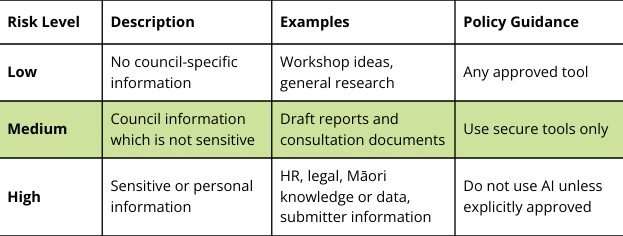
The tools for writing consultation documents use a secure, GDPR-compliant platform suitable for council information that isn’t sensitive or personal, so they are suitable for ‘medium risk’ use (including consultation documents) as shown in the framework I have developed to guide AI use by councils.
Any sensitive information should be added to your consultation document in Word, after you have finished using the tools to draft your content.
You can download my AI Policy Guide if you would like more details about safe use of AI.
How much time will the tools for consultation documents actually save me?
It will save you a lot of time up to the outline stage. Once you’re happy with the structure and outline I highly recommend using this as the basis for writing the consultation document yourself. Don’t delegate this to AI.
Get in touch to arrange access to the tools or to develop a customised version for use in Microsoft Copilot.
Phone: 021 215 4698
Email:
debra.bradley@writingforcouncils.co.nz
Download a printable copy of this information.